Gorgeous, working spreadsheets to sell — in your colors
The Spreadsheet Studio Skill Set turns Claude into your own spreadsheet designer. Tell it what you want to sell, and it builds a finished, auto-calculating planner for Google Sheets and Excel — plus the Etsy listing kit to go with it. No credits. No coding. No five-swatch color menu.
Get The Spreadsheet Studio
Spreadsheet tools that look easy… until you use them
From idea to Etsy-ready in one conversation
You chat with Claude like you would with a designer. It asks the right questions, shows you a plan, then builds and checks everything.
Tell Claude what you want
A wedding planner, a debt tracker, a homeschool planner — any niche. Add a mood, your brand colors, a Pinterest screenshot or your own art.
Approve the plan
See the tabs, the automations, your color swatch card and fonts before anything is built. Change whatever you like.
Download and list
Get the blank and sample spreadsheets, your listing photos, title, tags, description, a short video and the buyer access guide.
Use the Spreadsheet Studio skill. I want to sell a wedding planner for brides on a budget — soft blush and sage, elegant fonts.Everything a buyer expects — and the polish they remember
Art header on every tab
Your art (or a soft motif in your palette) with each tab's name in a pretty script. It's what makes a file look like a product.
A Start Here picture guide
Numbered callouts show buyers exactly where to type and what fills itself in. Fewer questions, fewer refunds.
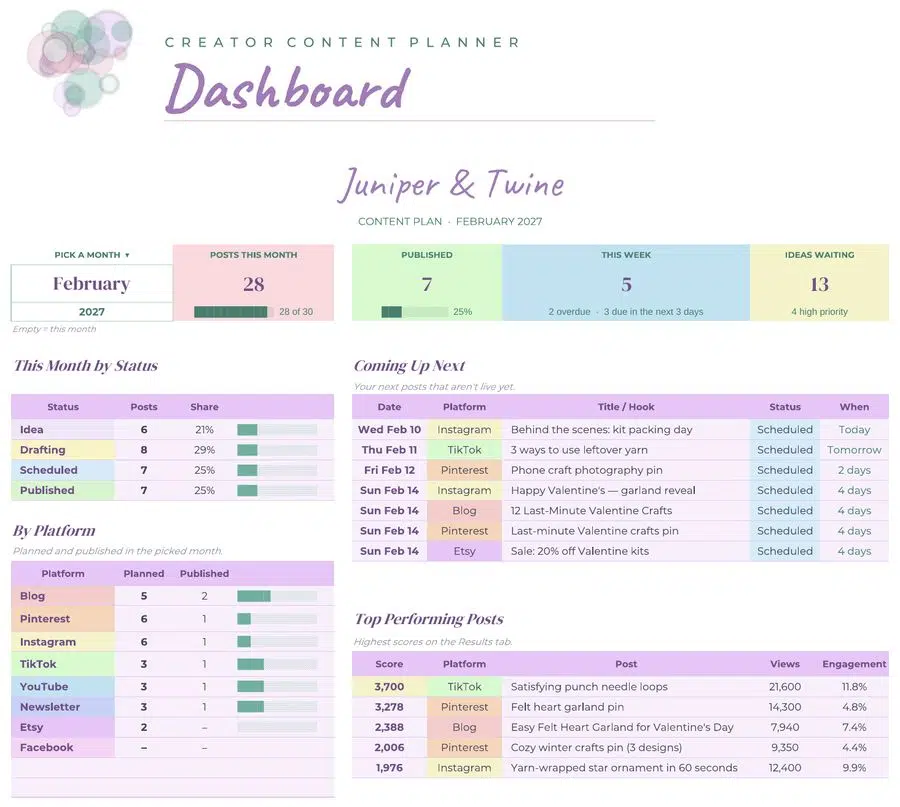
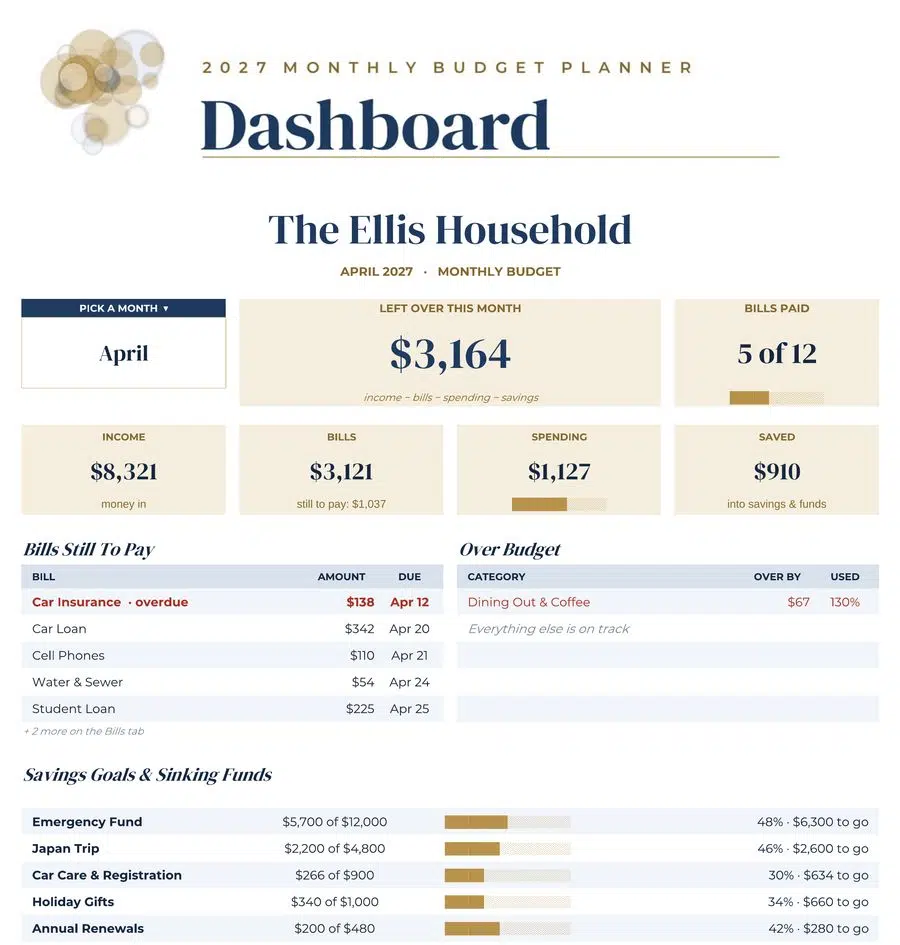
A dashboard up front
Countdowns, totals, progress bars and “coming up next” — the screenshot that sells your listing.
Formulas that actually work
Every page is rendered and scanned for broken formulas, and key totals are checked against the sample data before you see it.
Your colors, your fonts
Describe a mood, paste brand colors, upload a mood board or your art — the palette is built to match. Five font pairings included.
Blank + sample versions
A clean file for buyers and a filled-in showpiece with realistic sample data for your photos.
Your Etsy listing kit
Title, 13 tags, a warm description, listing photos sized for Etsy and a short silent video.
The buyer access guide
The one-page PDF with your “make a copy” link that Google Sheets buyers need.
Unlimited variations
New colorways, new niches, next year's edition — ask in plain words and Claude rebuilds and re-checks.
One skill, every kind of planner
Each of these was built with the Spreadsheet Studio — different niche, different palette, different personality.


Every planner teaches itself
Each product opens on a Start Here tab with a numbered picture guide, a color legend and one plain sentence per tab. Your buyer knows what to do in five seconds.
- White boxes mean “type here.” Shaded boxes calculate themselves.
- Check marks and drop-downs work the same in Google Sheets and Excel.
- Friendly messages instead of errors in the blank version.


Your listing, done with it
Ask for the listing kit and Claude writes and designs the parts that usually take an afternoon:
- A search-friendly title and 13 tags (character counts included)
- A warm, plain-English description
- Listing photos sized for Etsy: main image, “what's included,” feature shots and “how it works”
- A 5–15 second silent video for the video slot
- The buyer access guide PDF with your copy link
Why sellers switch to the Studio
| Typical credit-based generator | The Spreadsheet Studio | |
|---|---|---|
| Cost per build | Credits every time you build | No credits — build as often as your Claude plan allows |
| Colors | A handful of preset swatches | Any palette: a mood, brand colors, a screenshot or your own art |
| Artwork | Usually none | Art header on every tab — yours, or a motif in your palette |
| Tabs | Pre-set product types | You choose, rename, add or remove any tab |
| Buyer instructions | A line of text, if any | Start Here tab with a numbered picture guide |
| Variations | Often a paid add-on | Colorways and new editions on request |
What you'll need
A Claude account
Skills work on Claude's Free, Pro, Max, Team and Enterprise plans. A paid plan gives you room to build several products in a day.
One setting switched on
“Code execution and file creation” — it's a single toggle, and the Quick Start Guide shows you where.
A computer
The Claude desktop app or claude.ai in your browser. Building and downloading files is easiest on a computer.
Building files runs on your own Claude plan and uses more of it than a regular chat — that's what lets you build without credits.
The Flipbook Video Plugin
Turn your product screenshots and listing photos into a smooth flip-through video, so shoppers see every tab of your planner in motion. It's perfect for your Etsy video slot, Pinterest and social posts.
- Drop in your images and get a polished product video
- Works hand in hand with the photos the Studio makes for you
- Included free when you get the Spreadsheet Studio today
The Spreadsheet Studio Skill Set
- The Spreadsheet Studio skill — your designer, builder and quality checkerincluded
- 8 color palettes + custom palettes from your art, brand or mood boardincluded
- 5 font pairings (free Google Fonts, licensed for you to use)included
- 13 proven niche blueprints with suggested tabs and automationsincluded
- Etsy listing kit maker — photos, video, title, tags and descriptionincluded
- Quick Start Guide (PDF + Word) with copy-and-paste promptsincluded
- Full PLR rights — rebrand, edit, resell or give awayincluded
- Bonus: Flipbook Video Plugin for flip-through product videosfree bonus
Header Art Prompt Studio
Pick a palette, subject, art style and header shape and get ready-to-copy image prompts for ChatGPT, Midjourney, Canva or any image tool — plus a hand-off note so Claude matches your headers and colors to the art. Lock and shuffle to make a matching collection in minutes. Comes with full PLR, too.
Try it on your own niche
Install the skill, build your first planner, and see it for yourself. If it's not for you, contact us within 30 days for a refund.
Frequently asked
Do I need to know formulas or code?
Not at all. You chat with Claude in plain English. The skill handles the formulas, design and checking.
Are there credits or monthly fees?
No credits, ever. The Studio runs on your own Claude plan, so you can build as many products as your plan's usage allows.
Which Claude plan do I need?
Skills work on Free, Pro, Max, Team and Enterprise plans with “Code execution and file creation” switched on. A paid plan gives you more room to build several products in a day.
Do the spreadsheets work in Excel too?
Yes. Every product works in Google Sheets and Excel. The fonts are free Google Fonts — Google Sheets shows them automatically, and Excel shows them when they're installed. The header art is a picture, so it always looks right.
Can I use my own art and brand colors?
Yes — upload your art and Claude puts it on every tab and pulls your palette from it. Or paste brand colors, describe a mood, or upload a Pinterest screenshot.
What niches can I make?
Anything you can describe: wedding, budget, debt, business, meal planning, habits, content calendars, homeschool, moving, rentals and more. The skill includes proven blueprints for 13 popular niches.
Can I sell the spreadsheets I make?
Yes! The Spreadsheet Studio comes with full PLR (private label rights) at a single-license price. Sell the spreadsheets you make as your own products. You can also rebrand and edit the Studio itself, resell it at any price, give it away as a bonus or to build your list, and pass these rights on to your customers.
What if I run out of Claude usage mid-build?
Wait for your limit to reset, then ask Claude to pick up where it left off. On smaller plans, build one product at a time.
Your next best-seller is one conversation away
Bring the idea and the colors you love. The Studio brings the formulas, the polish and the listing.